
Learning how to self-publish on Amazon can feel complicated when you are doing it for the first time. You have to prepare your manuscript, format your book, create a professional cover, choose keywords and categories, set your price, upload your files, and make important publishing decisions before your book becomes available to readers.
However, the good news is that Amazon Kindle Direct Publishing, commonly known as Amazon KDP, gives independent authors a direct way to publish eBooks and print books through Amazon.
However, simply uploading a manuscript is not enough. A successful book needs professional presentation, accurate metadata, thoughtful pricing, strong discoverability, and a plan for reaching readers.
This complete guide explains how to publish a book on Amazon, from preparing your manuscript to launching and promoting your finished book.
What Is Amazon Kindle Direct Publishing?
Understanding how to self-publish on Amazon starts with knowing what KDP does and which publishing decisions remain your responsibility.
Through KDP, authors can create and manage book listings, upload manuscripts and covers, select book details, set pricing, and publish eligible eBook and print formats through Amazon.
For eBooks, Amazon currently supports common manuscript formats including DOC/DOCX, EPUB, and KPF. Amazon also provides Kindle Create and Kindle Previewer to help authors prepare and review digital books before publication. Amazon Kindle Direct Publishing
One important distinction is that KDP is a publishing platform, not your publisher. Amazon’s own metadata guidance states that KDP supports authors and publishers but is not itself the publisher of the book. Amazon Kindle Direct Publishing
Therefore, many of the important publishing decisions remain in your hands.
How to Self-Publish on Amazon: What You Need Before You Start
Before opening the KDP upload screen, prepare the major elements of your book.
You should ideally have:
- A completed manuscript
- A professionally edited version of the book
- Final proofreading
- Proper eBook or print formatting
- A professional book cover
- Final book title and subtitle
- Author name
- Book description
- Relevant keywords
- Appropriate categories
- Pricing strategy
- Publishing and distribution plan
As a result, preparing these elements before uploading can make the KDP process significantly easier.
It also reduces the risk of discovering major problems after your book has already been published.
Step 1: Finish and Edit Your Manuscript
The first step in self-publishing on Amazon happens before you ever log in to KDP.
Finish the manuscript.
Then revise it.
For this reason, your first draft should rarely become your published book without additional review. Authors often become so familiar with their manuscripts that they stop noticing unclear sentences, repeated ideas, timeline problems, pacing issues, or inconsistencies.
Depending on the book, the editorial process may involve:
Developmental Editing
Developmental editing focuses on the larger structure of the manuscript.
For fiction, this may include:
- Plot
- Character development
- Pacing
- Conflict
- Point of view
- Story structure
For nonfiction, it may include:
- Organization
- Argument
- Chapter sequence
- Audience
- Information gaps
- Clarity
Line and Copy Editing
Line editing improves the flow, clarity, tone, and effectiveness of the writing.
Copy editing focuses more closely on:
- Grammar
- Spelling
- Punctuation
- Syntax
- Consistency
- Style
Proofreading
Proofreading is generally one of the final quality checks before publication.
It catches remaining surface-level errors such as typos, spacing problems, punctuation mistakes, and formatting inconsistencies.
Publishing a clean manuscript can make a significant difference to the reader experience.
Step 2: Format Your Book for Amazon KDP
Once your manuscript is finalized, it needs to be formatted for the format you intend to publish.
However, an eBook does not behave exactly like a printed book.
Readers may change:
- Font size
- Screen orientation
- Device
- Line spacing
- Display settings
For most standard Kindle eBooks, the text should therefore be formatted so that it can reflow properly across different screens.
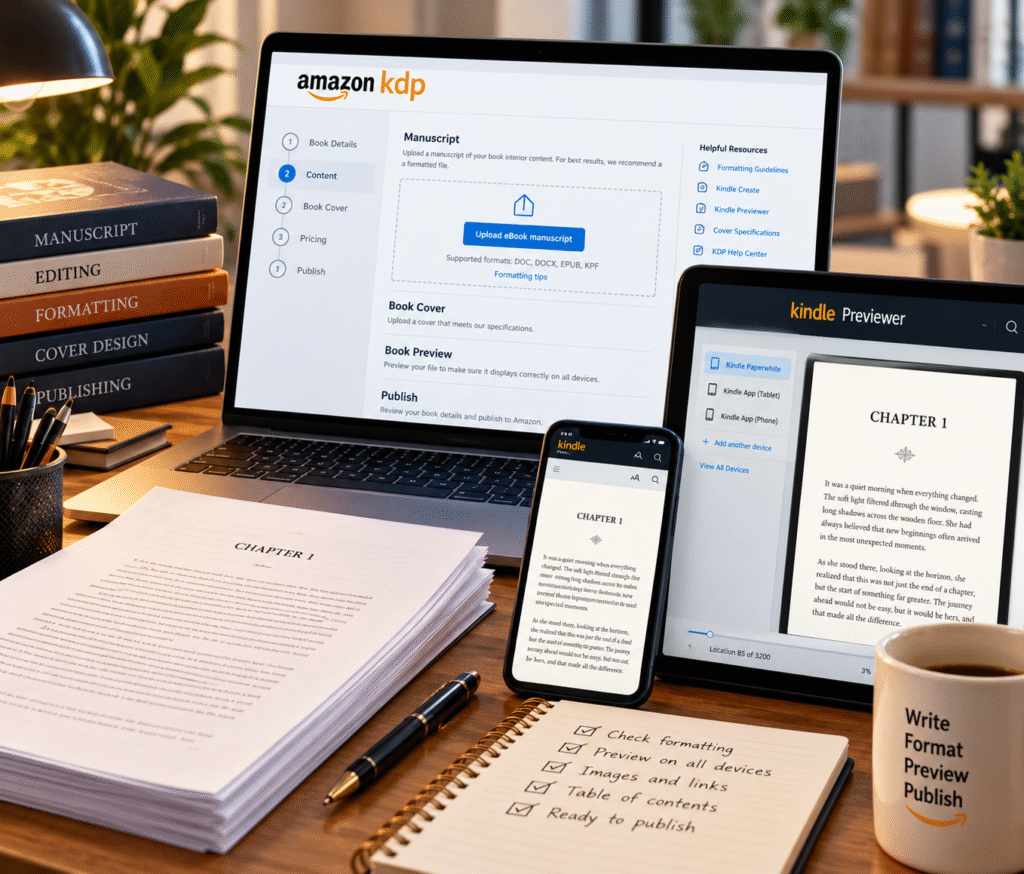
Amazon currently supports several eBook manuscript formats, including DOC/DOCX, EPUB, and KPF. Before publishing, use Kindle Previewer to check how your converted eBook displays across different devices.
Important eBook Formatting Elements
Check:
- Chapter headings
- Paragraph spacing
- Indentation
- Page breaks
- Images
- Scene breaks
- Table of contents
- Hyperlinks
- Front matter
- Back matter
Avoid relying on spaces or repeated line breaks to position text.
For example, what looks correct in a Word document may not display correctly on every Kindle device.
Use Kindle Previewer
Always preview your eBook before publication.
Check several sections of the manuscript rather than only the first few pages.
Look specifically for:
- Broken paragraphs
- Incorrect chapter breaks
- Missing images
- Strange spacing
- Incorrect indentation
- Broken links
- Table-of-contents problems
A professionally formatted book should feel intentional on both large and small screens.
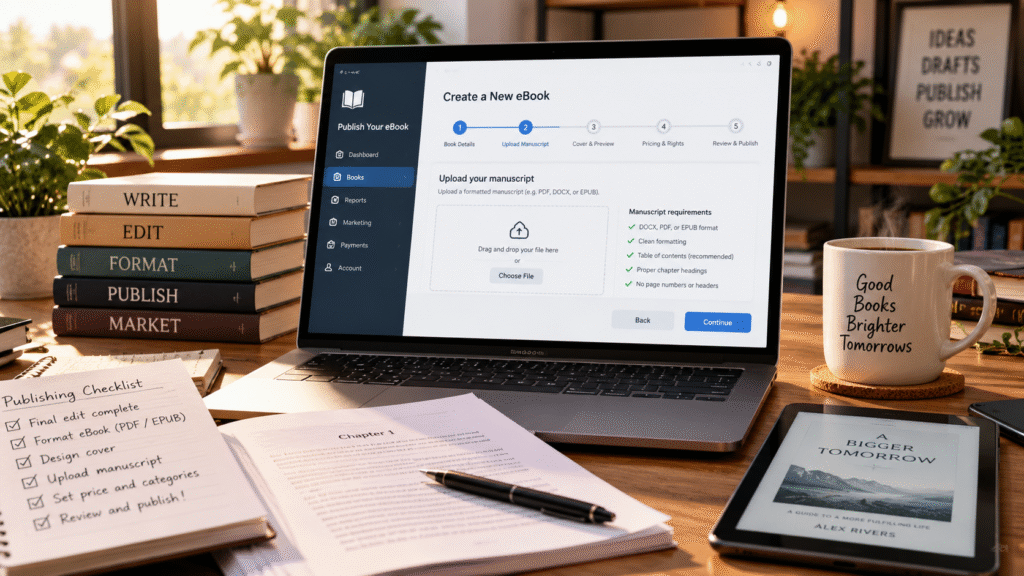
Step 3: Create a Professional Book Cover
Your cover is one of the first elements potential readers notice.
Before someone reads your description, reviews, sample, or author biography, they often see the cover.
Therefore, cover design is not simply decoration.
It is part of your book’s positioning and marketing.
A strong book cover should communicate:
- Genre
- Tone
- Audience
- Professional quality
- Subject or story expectations
A romance novel should not accidentally look like a corporate business book. A children’s title should not resemble an academic textbook.
The design should communicate what kind of reading experience the customer can expect.
Remember Thumbnail Size
Amazon shoppers often discover books while browsing search results.
Your cover therefore needs to remain recognizable when displayed as a relatively small thumbnail.
Make sure:
- The title remains readable
- The design is not overcrowded
- Important imagery remains visible
- The typography suits the genre
- The author name is presented appropriately
Amazon also requires the information shown on the cover, such as title and author information, to correspond with the book metadata you submit. Amazon Kindle Direct Publishing
Step 4: Create Your Book in Amazon KDP
Once you understand how to self-publish on Amazon, the KDP setup process becomes much easier to manage step by step.
Amazon’s current KDP workflow begins from the Bookshelf, where you select Create and choose the type of book you want to publish. Amazon Kindle Direct Publishing
You will then enter information that helps build your Amazon book detail page.
At this stage, accuracy becomes extremely important.
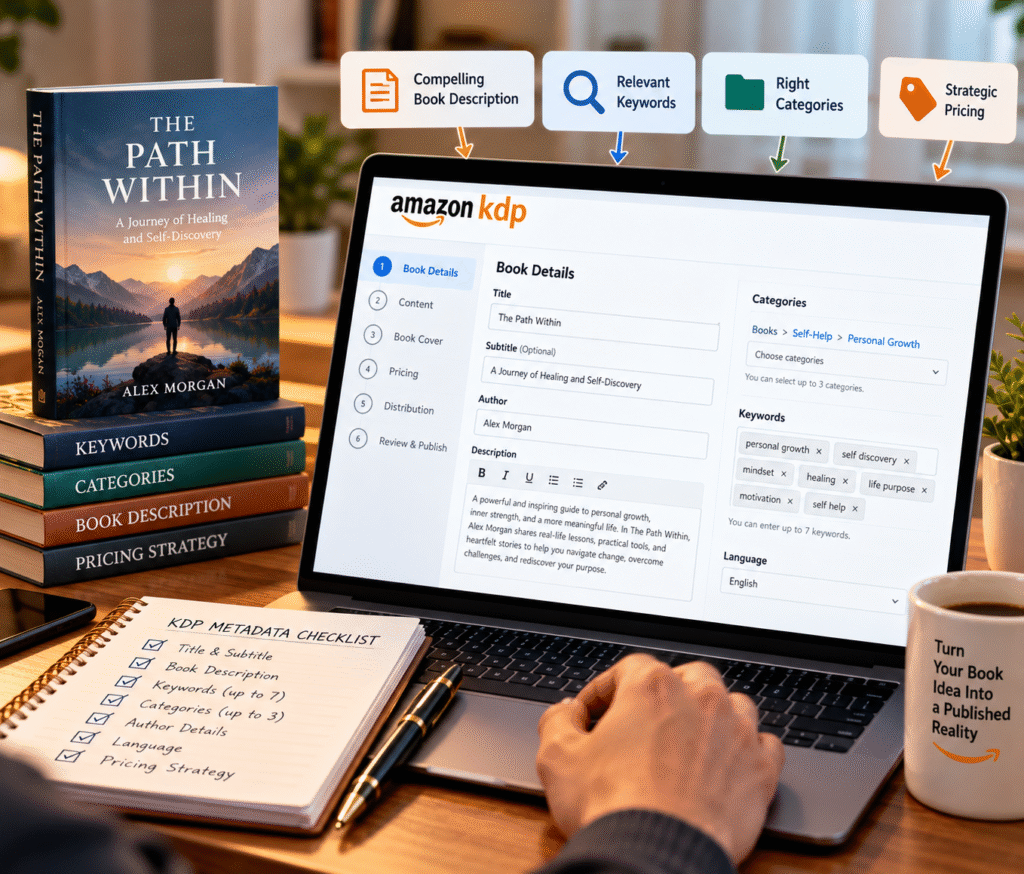
Step 5: Enter Your Book Details Carefully
Your book details, also called metadata, help Amazon understand what your book is and show customers accurate information.
Metadata includes information such as:
- Book title
- Subtitle
- Author
- Contributors
- Description
- Keywords
- Categories
- Language
- Audience information
Several book-detail fields may be difficult or impossible to change after publication, so Amazon recommends reviewing your information carefully before submitting the book. Amazon Kindle Direct Publishing
Write an Effective Book Description
Do not treat your description like a technical summary.
It is sales copy.
For fiction, your description should create curiosity without revealing the entire story.
For nonfiction, it should clearly communicate:
- The problem
- The audience
- What readers will learn
- Why the information matters
Keep paragraphs reasonably short so the description is easy to scan.
A strong opening is especially important.
Step 6: Choose Amazon KDP Keywords
Keywords help Amazon understand what customers may be searching for when looking for a book like yours.
Amazon currently allows authors to enter up to seven keywords or short keyword phrases. In addition, choose terms that accurately represent your book and reflect how readers actually search.
Think like your reader.
For fiction, useful keyword concepts may include:
- Setting
- Character type
- Story themes
- Tone
- Tropes
- Subgenre
For nonfiction, consider:
- Problems readers want to solve
- Topics
- Skills
- Goals
- Questions
- Audience needs
Avoid stuffing unrelated high-volume terms into the keyword fields.
Ultimately, relevant keywords are more useful than keywords that attract the wrong reader.
Amazon specifically warns against misleading keywords, unrelated author names, promotional claims, and other metadata intended to manipulate search results. Amazon Kindle Direct Publishing
Step 7: Select the Right Amazon Book Categories
Similarly, categories work like digital bookshelves.
They help Amazon organize books and allow customers to browse topics or genres they already enjoy.
KDP currently allows authors to select up to three categories during book setup. Amazon Kindle Direct Publishing
Choose categories based on relevance first.
Do not place a book into an unrelated category simply because you think it may be easier to rank there.
Consider:
- Your primary genre
- Subgenre
- Reader expectations
- Comparable titles
- Central subject
The right categories can help Amazon understand where your book belongs.
Step 8: Upload Your Manuscript and Cover
Afterward, once your details are complete, upload your final files.
For an eBook, this generally includes:
- eBook manuscript
- Cover image
For print books, you will need properly prepared print interior and cover files.
After uploading, use Amazon’s preview tools to inspect the book carefully.
Do not rush through this stage simply because you are excited to publish.
Review:
- Chapter starts
- Page breaks
- Images
- Headings
- Table of contents
- Formatting
- Cover appearance
- Front matter
- Back matter
A few extra minutes reviewing the final files can prevent an embarrassing mistake from reaching readers.
Step 9: Set Your Book Price and Royalty Option
Meanwhile, pricing influences how readers perceive your book and how much you may earn from eligible sales.
For Kindle eBooks, Amazon currently provides two royalty structures:
- 35% royalty option
- 70% royalty option
Eligibility for the 70% option depends on factors such as territory, pricing, and other KDP requirements. Delivery costs may also apply under the 70% calculation. Amazon Kindle Direct Publishing
Do not choose a price simply because another author uses it.
Consider:
- Genre
- Book length
- Reader expectations
- Comparable books
- Your marketing strategy
- Whether the book is part of a series
- Your long-term publishing goals
Pricing can also be adjusted later, subject to Amazon’s applicable requirements.
Step 10: Decide Whether to Join KDP Select
KDP Select is optional.
It is a 90-day program for Kindle eBooks. When an eligible eBook is enrolled, it is automatically included in Kindle Unlimited and may qualify for certain Amazon promotional tools. Amazon Kindle Direct Publishing
However, there is an important tradeoff.
During the KDP Select enrollment period, the digital eBook is subject to Amazon’s exclusivity requirements. Physical editions can still be distributed elsewhere, and Amazon allows limited sampling under its program rules. Amazon Kindle Direct Publishing
KDP Select May Make Sense If:
- Amazon is your primary eBook marketplace
- Kindle Unlimited readers are important to your strategy
- You want access to eligible KDP promotional tools
- You are comfortable with digital exclusivity during enrollment
Wide Distribution May Make More Sense If:
- You want to sell your eBook through multiple retailers
- You want broader digital distribution
- You already have readers outside Amazon
- Retailer diversity is important to your publishing plan
Therefore, there is no single correct choice for every author.
Choose based on your audience and distribution strategy.
Step 11: Review Everything Before Publishing
Finally, before clicking the final publishing button, perform one last review.
Check:
- Book title
- Subtitle
- Author name
- Description
- Keywords
- Categories
- Manuscript
- Cover
- Pricing
- Rights
- Distribution choices
Make sure your cover details match your metadata.
Also confirm that the version you uploaded is actually the final manuscript.
It sounds obvious, but authors working through multiple files can accidentally upload an earlier draft.
Use clear file names such as:
Book-Title-FINAL-eBook.epub
instead of:
Book-final-final-new-v7.docx
A clean publishing workflow reduces mistakes.
Step 12: Publish Your Book on Amazon
Once everything has been reviewed, submit the book for publication.
However, remember that publishing is not the end of the process.
Making a book available and making readers aware of that book are two different things.
Once your title is live, your attention should shift toward discoverability and marketing.
What to Do After Publishing on Amazon
However, many first-time authors assume Amazon will automatically begin sending large numbers of readers to a newly published book.
That is rarely a useful marketing strategy.
Instead, you still need to create reasons for readers to discover the book.
Optimize Your Amazon Book Page
Review the live listing.
Check:
- Cover
- Description
- Author information
- Formats
- Categories
- Pricing
- Book sample
- Purchase options
Make sure everything appears as expected.
Build Your Author Platform
Your author platform may include:
- Author website
- Email list
- TikTok
- YouTube
- Podcast appearances
- Media coverage
- Book communities
You do not need to use every channel.
Focus on the places where your readers are most likely to spend time.
Develop a Book Marketing Strategy
A strong launch can combine:
- Email marketing
- Social media
- Advance readers
- Book reviews
- Amazon advertising
- Media outreach
- Podcast interviews
- Influencer outreach
- Author events
- Book clubs
- Content marketing
Ideally, marketing should begin before publication rather than starting only after the book goes live.
Encourage Legitimate Reader Reviews
In addition, reviews can help future customers understand what other readers thought about the book.
Focus on attracting genuine readers and legitimate feedback.
Potential review audiences may include:
- ARC readers
- Book bloggers
- Genre reviewers
- Book clubs
- Influencers
- Existing readers
Never build your publishing strategy around manipulated or misleading reviews.
Authenticity matters.
How to Self-Publish on Amazon Without These Common Mistakes
Knowing how to self-publish on Amazon also means understanding the mistakes that can reduce your book’s professional quality and discoverability.
Avoid these common mistakes.
Publishing Before the Manuscript Is Ready
Excitement can encourage authors to publish too quickly.
Finish editing and proofreading first.
Using an Amateur Cover
Readers often judge the professionalism and genre of a book from the cover before reading anything else.
Invest in strong presentation.
Ignoring Book Formatting
Poor formatting creates a frustrating reading experience.
Preview the final book on multiple screen sizes where possible.
Choosing Irrelevant Keywords
Keywords should attract people who may genuinely want your book.
More traffic is not automatically better if it is the wrong traffic.
Choosing Misleading Categories
Select categories that accurately represent your book.
Amazon specifically advises authors to use relevant categories rather than attempting to manipulate placement. Amazon Kindle Direct Publishing
Writing a Weak Book Description
Your description should make readers want to learn more.
Do not treat it as an afterthought.
Publishing Without a Marketing Plan
A book can be professionally written and beautifully designed yet remain invisible if readers never discover it.
Prepare your launch before publication.
Amazon KDP Publishing Checklist
Before publishing your book on Amazon, confirm that you have completed the following:
Manuscript
- Final revision complete
- Editing complete
- Proofreading complete
- Formatting complete
- Table of contents working
- Final file checked
Cover
- Professional design
- Correct book information
- Readable at thumbnail size
- Appropriate for genre
- Final file ready
Amazon Listing
- Title correct
- Subtitle correct
- Author name correct
- Description optimized
- Keywords selected
- Categories selected
- Audience details correct
Publishing
- Manuscript uploaded
- Cover uploaded
- Preview completed
- Pricing selected
- Royalty option reviewed
- Distribution strategy chosen
- KDP Select decision made
Marketing
- Author website prepared
- Email list ready
- Social content prepared
- Review strategy planned
- Launch campaign prepared
How to Self-Publish on Amazon: Frequently Asked Questions
Can Anyone Self-Publish on Amazon?
KDP allows eligible authors and publishers to create and manage books directly through the platform, subject to Amazon’s account, content, and publishing requirements.
Do I Need an ISBN for a Kindle eBook?
No. Amazon states that an ISBN is not required to publish an eBook through KDP. Print formats that require an ISBN can use an eligible KDP-provided ISBN or an ISBN supplied by the publisher. Amazon Kindle Direct Publishing
Can I Publish an eBook and Paperback on Amazon?
Yes. KDP supports digital and eligible print formats. When book details match correctly, Amazon can attempt to link available formats on the same book detail page so readers can choose their preferred edition. Amazon Kindle Direct Publishing
How Many Keywords Can I Use on Amazon KDP?
KDP currently allows up to seven keywords or short keyword phrases. They should accurately represent the content and reflect terms readers may genuinely search for. Amazon Kindle Direct Publishing
How Many Categories Can I Select?
KDP currently allows authors to choose up to three categories during title setup. Amazon Kindle Direct Publishing
What File Format Should I Use for a Kindle eBook?
KDP supports several formats, including DOC/DOCX, EPUB, and KPF. Amazon recommends using Kindle Previewer to check how your converted eBook will display before publication. Amazon Kindle Direct Publishing
Is KDP Select Required?
No.
KDP Select is optional. Authors can decide whether the program’s Kindle Unlimited inclusion and promotional opportunities fit their publishing strategy. Enrollment currently runs in 90-day periods and includes digital exclusivity requirements for the enrolled Kindle eBook. Amazon Kindle Direct Publishing
Is Self-Publishing on Amazon Worth It?
Overall, Amazon KDP can give independent authors direct access to a major global book marketplace
But access to the platform does not automatically create a professionally published book.
The quality of your:
- Writing
- Editing
- Formatting
- Cover
- Metadata
- Pricing
- Distribution
- Marketing
still matters.
Authors who learn how to self-publish on Amazon as a complete publishing process are better prepared than those who simply upload a file and hope for sales.
Final Thoughts: How to Self-Publish on Amazon Successfully
Learning how to self-publish on Amazon is really about learning how the entire publishing process fits together.
Amazon KDP gives authors the tools to upload and distribute their work, but successful self-publishing requires preparation long before you click Publish.
Start with a strong manuscript.
Edit it professionally.
Format it correctly.
Create a cover that communicates quality.
Research your keywords and categories.
Set your pricing thoughtfully.
Preview every file.
Then build a marketing strategy that helps readers discover your book.
The goal should not simply be to get your book onto Amazon.
The goal should be to publish a book that looks professional, reaches the right readers, and gives you a foundation for building a long-term author career.
Need Help Publishing Your Book on Amazon?
Virtue Publishing helps authors navigate the complete publishing process, from manuscript editing and formatting to cover design, metadata optimization, Amazon KDP setup, distribution, and book marketing.
Whether you are preparing your first book or improving an existing release, professional publishing support can help you avoid common mistakes and present your work with confidence.
PUBLISH YOUR BOOK WITH VIRTUE PUBLISHING